New Release: DjavuShop v0.3!

What is DjavuShop?

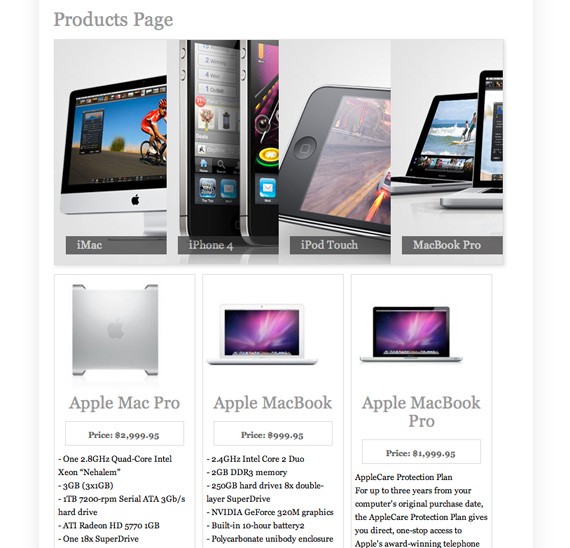
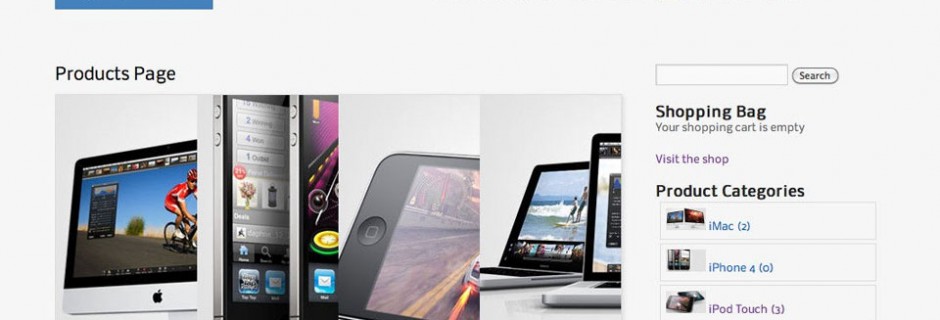
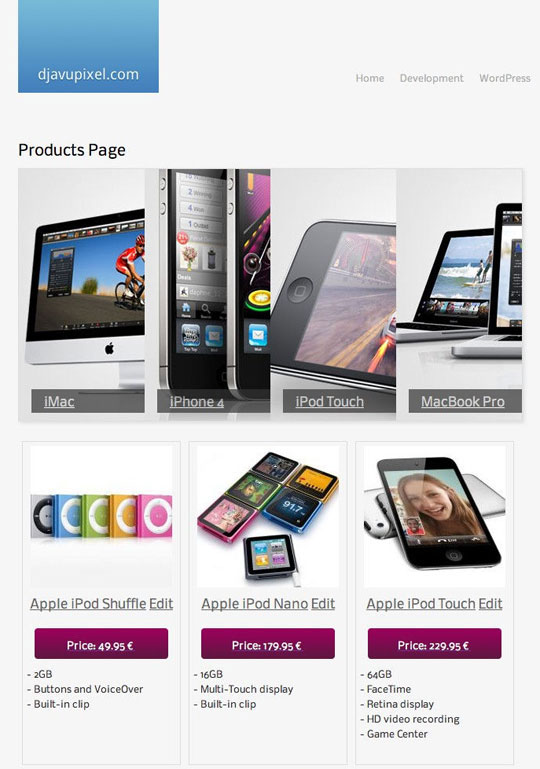
DjavuShop is a powerful theme made for WP e-Commerce. WP e-Commerce is a free bolt-on shopping cart that lets customers buy your products, services and digital downloads online. It is incredibly easy to set up shop . With DjavuShop, you can show your products into a beautiful and user-friendly accordion slider.

Benefits:

  • Saves Development Time
  • Beautiful Default Design
  • WP e-Commerce has Powerful Features & API

[download id=”2330″ format=”3″]

Requirements

  • WordPress > 2.8, works great with WordPress 3
  • WordPress WP e-Commerce plugin

Theme Installation

  • Unzip the zip file that you downloaded here and locate the ‘djavu-shop’ folders inside the ‘theme’ folder. This is the folder and contents you will need to upload to your webserver.
  • FTP Upload the ‘djavu-shop’ folders to your ‘wp-content/plugins/wp-e-commerce/themes/’ directory on your web server, then you can activate the theme.
  • Login to your wp-admin section and browse to Store>Settings>Presentation page, click on the drop-down list and djavu-shop theme should be in the list. Select it and save changes.

Djavu-shop v. 0.3 Theme is

  • 100% unique and has a modern design
  • 100% free for personal or commercial use, licensed under creative commons license.

Get it!

[download id=”2330″ format=”3″]

[donateplus]

PS: use it at your own risk


Posted

in

by

Comments

41 responses to “New Release: DjavuShop v0.3!”

  1. clippingimages Avatar

    nice combination of stuffs pal.. cool! keep going on.. 🙂

  2. 200 Seriously Useful Articles for Web Designers and Developers | Prabaharan CS Blog

    […] DjavuShop a powerful theme for WP e-Commerce […]

  3. Top 5 Excellent E-Commerce Plugins for WordPress | Ispey Seo Expert

    […] it is a cheap solution and I created a free theme for it for thoose who are interested – http://www.djavupixel.com/wordpress/new-release-djavushop-v03-wp-ecommerce/ I think I will give shopp a […]

  4. Nitin Avatar

    Hello ,

    I cant Get The Top sliding group image on product page..
    my website http://www.lowpriceshop.in
    please tell me how to solve that

  5. djavupixel Avatar

    Hi,

    did you follow the first part of this tutorial: http://www.1stwebdesigner.com/wordpress/how-to-build-custom-wp-e-commerce-theme-1/

    Check the following points under “Preparing WP e-Commerce for our theme”
    -> Add 4 categories in WP e-Commerce
    -> Configure presentation settings

    Good luck! 🙂

  6. anekadiscs Avatar
    anekadiscs

    I have download your themes, and try to activated in my site. Unfortunately they give some error like this :

    Broken Themes

    The following themes are installed but incomplete. Themes must have a stylesheet and a template.
    Name Description
    djavu-shop Stylesheet is missing.
    __MACOSX Stylesheet is missing.

    any info to solve this?

  7. djavupixel Avatar

    Where did you put the theme?
    WP e-Commerce themes must be installed on this folder (wordpress-directory)/wp-content/plugins/ wp-e-commerce/themes/default)

    For this theme to work you also need the WP e-Commerce plugin

  8. Sven Avatar
    Sven

    Great tutorial! But somehow the matching wp-Theme (your customized twenty-elewen) – not your downloadable wpec-theme – is missing, isn’t it?

  9. djavupixel Avatar

    Djavushop (the wp ecommerce theme) is complete. The purpose of Djavushop was to integrate it on your wordpress theme, as I think it can fit on most of the designs. Maybe a few tweaks may be needed…
    Twenty-Eleven is Djavupixel.com theme only 🙂 So no it isn’t missing sorry

  10. Sven Avatar
    Sven

    so i’ll build it up on my self customzied Twenty Ten WP3 default Theme and your Djavu-WPEC 😉 I’ll post you the result.. Thanks a lot & have a nice Weekend!

  11. djavupixel Avatar

    Cool! I can’t wait to see the results!

    1. Sven Avatar
      Sven

      btw. i decided building up “my own” clean wp3+wpec themes first, later i’ll addon parts from your theme, so standby please 😉

  12. Sven Avatar
    Sven

    me neither 😉

  13. Sven Avatar
    Sven

    Day2: Is there any way to limit the categorys’ accordion header to four cat only? Or at least to set a fixed witdth for .kwicks – seems that the width is calculated by the amount of categories? And i need much more than four only…
    Or did i missed some simmilar thread down here?
    Thanks a lot!
    (Btw. guess i won’t use the gridview, cause i need to upgrade to goldcart anyway.. need more than one prouct picture)
    Slowly but growing… 😉
    Cheers!

  14. djavupixel Avatar

    You have 2 possibilities for the accordion:
    – 1st: if you want to show all categories (+sub categories) you have to change the width of .kwicks to be smaller
    – 2nd: Go to my tutorial:
    go to the bottom of the page where title is “Display recently added products without the WP e-Commerce function (for more flexibility)”
    You could do the same for the categories

    It is up to you to decide what you want to do 🙂
    I hope it can help you

  15. Steve Avatar
    Steve

    I’ve got the theme installed and working, except on each individual category and product page there is a ‘swirling’ image that has text next to it saying “Updating”. But it never stops or seems to update anything.

    Any tips on what this could be and where to look to correct it?

    1. Steve Avatar
      Steve

      I found the issue with the “Updating” never going away, I had ‘Display Fancy Purchase Notifications’ set to yes.

      1. djavupixel Avatar

        Thanks 🙂 Because I even did not knew it… WP e-commerce is a bit buggy… so probably you will find other things

  16. Myles Avatar
    Myles

    Is there a way around the fieldsets “things like quantity, size” not showing in IE?

    1. Sven Avatar
      Sven

      in the wpec-admin? check
      yourdomain.com/wp-admin/admin.php?page=wpsc-settings
      click on “presentation” and uncheck the “show quantity”…
      maybe?

      1. djavupixel Avatar

        Ups I think you understood the question better than I did 🙂
        BTW Are you finished with you WPEC site?

        1. Sven Avatar
          Sven

          see above 😉 no yet, but actully todays deadline for our shop.. i wanted to startup with some kind of “clean” temlate, so i trashed everything and started again – a couple of times … nearly finished my “release candidate” but w/o your features. These i’ll add on in the next step… First need to do the boring things before playing the fancy stuff 😉

  17. djavupixel Avatar

    Sorry I don’t have IE installed on my mac… I will try to look at it soon

  18. Sven Avatar
    Sven

    + i deceided to upgrade to god cart – cause we needed multiple product pictures.. that includes (another) gridview. but i’m fancy for your fancy slider 😉

  19. adit Avatar
    adit

    hey..that’s great but why is the preview don’t work like your tutorial..?

    1. djavupixel Avatar

      Sorry I did not understood what you mean?

      1. Shailendra Avatar
        Shailendra

        I have the same query ,
        The Preview of our WP e-Commerce Theme image have multiple (3) products in a row , which is allso called as grid view. however the the theme preview link <a href="http://www.1stwebdesigner.com/wordpress/custom-wp-e-commerce-theme-2/"here has no grid views for products .
        could you please explain how we can get those.

        btw , i did not like the crafty theme i was searching for the this exact theme for a long time now !

  20. Rudy Avatar
    Rudy

    This looks to be very promising, but where/how do I activate your theme once it has been FTP’d to the location specified. It does not show in the themes dropdown or the plug-in page.

    Thanks,
    Rudy

  21. Joey Snijders Avatar

    Looks nice, result: HERE
    Thanks!

  22. Rudy Avatar
    Rudy

    You commented on the location of the “djavu-shop” theme files to be installed here:
    /wp-content/plugins/ wp-e-commerce/themes/default)

    Why would you want to alter the default theme?

    Other instructions don’t mention this location (/wp-content/plugins/wp-e-commerce/themes/), which if you used the above location and installed in its own directory.
    If I use this location, it does not populate the them option drop-down.

    If you upload the theme to /wp-content/uploads/wpsc/themes, the accordion feature does not display as the icons are in a Gred View. The Product Group Settings Grid View option is set to “No”.

    If I upload the files to both locations, the accordian feature works with all of my categories.

    So, being a newbie…
    Which is the correct directory location or locations?

    Which location would you change the coding for the files?

    It’s interesting, that I have not changed one line of code and it appears to work…almost. I just need clarification on the above directory locations and if coding still needs to be implemented.

  23. pil Avatar
    pil

    It’s only for wp e-commerce 3.7, not for 3.8, isn’t it?

  24. lokolo Avatar
    lokolo

    Hi,
    I’m using wp-ecommorce 3.8.6 but the theme is listed under “Broken Themes” and the description says: “Stylesheet is missing” although djavu-shop.css exists…

  25. Magento Developer Avatar

    This is an excellent post. I really appreciate with you. I enjoyed the post. Thanks for sharing.

  26. lucky Avatar
    lucky

    Download link is broken .. Can you please update the same

  27. osCommerce One Page Checkout Avatar

    Great post. I found what I was looking for. Do you mind if I post this on my website and give you credit? If not, it’s ok.

  28. Magento share cart for multi store Avatar

    I found this article is really useful for me in my job. Thanks for sharing this useful information

  29. ososoba Avatar
    ososoba

    Does anybody have a working download link?

  30. Landing Page WordPress Themes Avatar

    Wow, nice e-commerce theme for being free!

Leave a Reply

Your email address will not be published. Required fields are marked *